When your Indesit tumble dryer stops heating, it disrupts your daily routine. Dryers are essential household appliances, and a sudden malfunction can leave you frustrated with damp clothes piling up. This guide will help you identify the common reasons why your dryer might not be heating and show you step-by-step solutions to fix it. Let’s dive in!
What Are the Common Reasons for an Indesit Tumble Dryer Not Heating?
If your Indesit dryer isn’t heating, it could be caused by a variety of mechanical or maintenance-related issues. Let’s explore the potential causes one by one.
Is the Heating Element Faulty?
The heating element is the core component responsible for producing the heat necessary to dry your clothes. Over time, wear & tear can make it to fail. Here’s how to identify this issue:
What are the Signs of a Faulty Heating Element?
Dryer runs but produces cold air.
Clothes remain damp even after a full cycle.
Visible cracks or breaks in the heating coil when inspected.
What is the Solution To Fix Heating Element?
Check the heating element using a multimeter to test for continuity. If it’s damaged or shows no continuity, you’ll need to replace it. Consult your dryer’s manual to locate the element.
Could the Thermostat Be Malfunctioning?
The thermostat controls the temperature inside your dryer, ensuring that it doesn’t overheat or stay too cold. A faulty thermostat could protect the dryer from heating properly.
How to Identify the Issue in Thermostat?
Dryer overheats and shuts off prematurely.
Clothes feel warm but aren’t dry.
What is the Solution To Fix Thermostat?
Test the thermostat with a multimeter. If it’s defective, replace it with a compatible one, as per the manufacturer’s recommendations.
Is the Thermal Fuse Blown?
The thermal fuse is a safety feature designed to prevent overheating. If the dryer becomes too hot, the fuse will blow, cutting off power to the heating system.
What are the Common Signs?
Dryer doesn’t heat up at all.
The machine might start but doesn’t complete the drying cycle.
What is the Solution To Fix the Issue?
Locate the thermal fuse (typically near the heating element) and test it for continuity. Replace it if necessary, as blown fuses cannot be repaired.
Are the Filters or Vents Clogged?
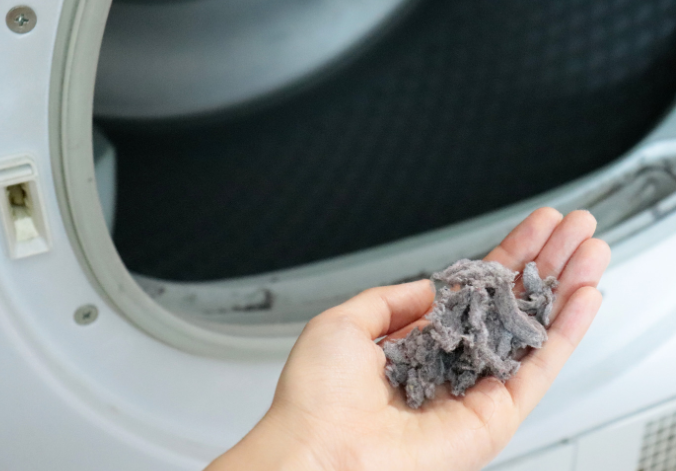
Lint and debris can easily accumulate in your dryer’s filters and vents, reducing airflow and preventing the dryer from heating properly.
What are the Signs of a Blockage?
Longer drying times.
The outer side of the dryer feels hotter than usual.
A burning smell during operation.
What is the Solution to fix blockage in filters or vents?
Clean the lint filter after every cycle and regularly inspect the exhaust vents for blockages. Use a vacuum or a vent cleaning kit to clear out any debris.
Could Overloading Be the Issue?
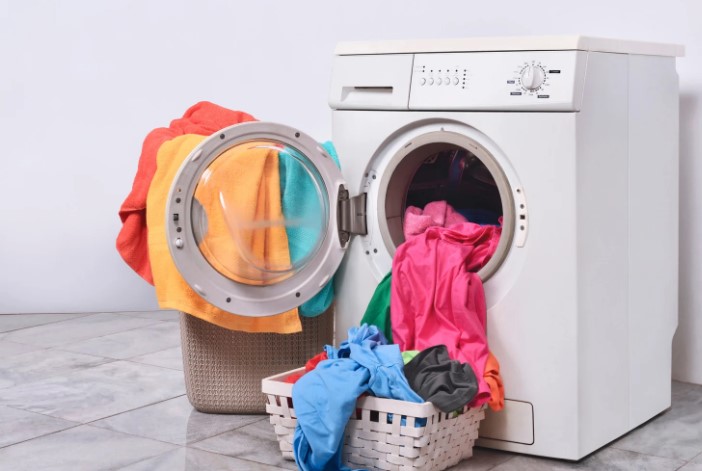
Overloading your dryer can strain its components and make it harder for heat to circulate evenly.
How to Identify Overloading?
Clothes come out damp and tangled.
The dryer struggles to spin properly.
What is the Solution To Fix Overloading?
Follow the manufacturer’s load capacity guidelines. Break larger loads into smaller batches to allow better airflow and heating.
How to Diagnose and Fix an Indesit Tumble Dryer Not Heating?
Now that you understand the possible causes, let’s go through a step-by-step guide to diagnose and fix the issue.
Step 1: Check the Power Supply
Before diving into complicated repairs, ensure that your dryer is receiving enough power to function.
Verify the power outlet by testing it with another appliance.
Make sure the plug is safely inserted & there are no loose connections.
Check for tripped circuit breakers or blown fuses in your home’s electrical system.
Step 2: Inspect and Clean the Filters
A clogged lint filter or vent can restrict airflow and reduce heating efficiency.
How to Clean the Filter?
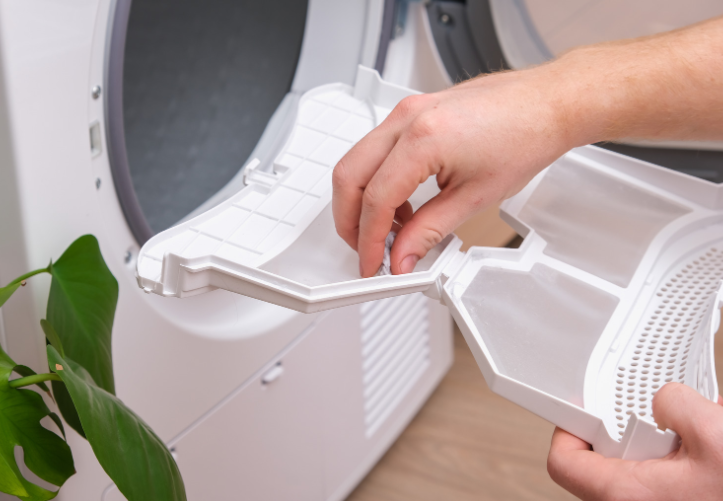
Remove the lint filter from the dryer.
Brush off lint and rinse the filter under warm water.
Let it dry completely before reinserting it.
How to Clean the Ventilation System?
Disconnect the vent hose and remove any debris or lint buildup.
Reconnect the hose securely.
Step 3: Test the Heating Element
If basic cleaning doesn’t resolve the issue, the heating element might need to be inspected.
How to Test the Heating Element?
Make use of a multimeter to test the heating element for continuity.
If it’s broken, replace it with a compatible heating element as recommended by the manufacturer.
Step 4: Examine the Thermostat and Thermal Fuse
Testing the Thermostat:
Disconnect the wires from the thermostat and test for continuity using a multimeter.
Replace if it shows no continuity.
Testing the Thermal Fuse:
Locate the fuse and test it similarly with a multimeter.
Replace if it’s blown, as a thermal fuse cannot be reset.
Step 5: Seek Professional Help If Needed
If the problem persists despite your efforts, it may be time to contact a professional technician. They can diagnose deeper issues like wiring faults or motor problems. Repair costs for common issues:
Replacing a heating element: £50–£100.
Replacing a thermostat: £40–£80.
Labor charges: £50–£70 per hour.
How Can You Prevent Heating Problems in Your Indesit Dryer?
Prevention is always better than repair. Follow these simple tips to avoid heating problems in the future:
Regular Cleaning and Maintenance
Clean the lint filter after every use.
Deep-clean the dryer vents at least twice a year to prevent lint buildup.
Avoid Overloading Your Dryer
Stick to the recommended load sizes. Overloading not only affects performance but also shortens the dryer’s lifespan.
Inspect Your Dryer’s Components Periodically
Schedule routine checks for the heating element, thermostat, and other critical parts. Early detection can save you costly repairs.
Conclusion
If your Indesit tumble dryer not heating, it’s usually caused by a faulty heating element, thermostat, or clogged filters. Fortunately, most of these issues can be resolved with a little troubleshooting and regular maintenance. By following the steps outlined in this guide, you can save both time and money while keeping your dryer in top condition.
Remember, routine maintenance and care go a long way in preventing future problems. If the issue persists, don’t hesitate to consult a professional. Keep your dryer running efficiently to enjoy hassle-free laundry days!
FAQs About Indesit Tumble Dryer Heating Problems
1. Why is my dryer running but not heating?
This could be due to a faulty heating element, thermostat, or a blown thermal fuse.
2. How much does it cost to replace a dryer’s heating element?
On average, replacing a heating element costs between £50–£100, excluding labor.
3. Can I use my tumble dryer if it’s not heating?
While you can run it, it won’t dry clothes effectively. It’s best to fix the issue first.
4. How do I reset the thermostat on my Indesit tumble dryer?
Some Indesit models have a reset button near the thermostat. Refer to your user manual for exact instructions.
5. What should I do if my dryer stops mid-cycle?
This could be due to overheating or a tripped thermal fuse. Let the dryer cool down and inspect the components.
Home Diagnostics and Technical Standards Specialist at Hello Mag. She provides high-level Expertise in appliance mechanics and scientific pest management, ensuring every guide follows strict safety protocols and manufacturer standards. As a leading Authority on technical home specs, Kanimozhi audits complex data to provide homeowners with the most accurate, verified, and reliable diagnostic solutions available.
Are you searching for how much to renovate a bedroom in the UK? Renovating a bedroom can transform your home and increase its value, but understanding the costs involved is crucial to avoid overspending.
Whether you’re planning a simple refresh or a complete overhaul, this guide will walk you through the factors affecting costs, practical budgeting tips, and creative ideas to make your bedroom renovation a success.
What Are The Factors Influencing Bedroom Renovation Costs?
1. Scope of the Renovation
The extent of your renovation plays a significant role in determining the overall cost:
Basic Renovation (£300–£500 per m²): Includes painting over stairwell and walls, minor repairs, and inexpensive flooring options like laminate or carpet.
Mid-Range Renovation (£700–£1,000 per m²): Covers upgraded flooring like linoleum in bathroom, built-in wardrobes, and improved lighting.
High-End Renovation (£1,500+ per m²): Features luxury materials, en-suite additions, and smart home technology.
2. Size of the Bedroom
The larger the bedroom, the higher the renovation costs due to increased material and labour requirements. Renovations are typically priced per square metre, making accurate measurements essential during planning.
3. Regional Variations
Costs differ significantly across the UK. For example:
Renovation expenses are generally higher in London and the South East.
Labour and material costs are more affordable in Northern regions.
4. Labour and Professional Services
Hiring professionals like decorators, carpenters, and electricians adds to the cost:
Decorator fees average £150–£200 per day.
Electricians charge around £40–£60 per hour for rewiring or lighting installations.
Custom carpentry for built-in wardrobes can range from £1,000 to £5,000.
How Much to Renovate a Bedroom in the UK?
How Much Does It Cost to Convert a Loft into a Bedroom?
Converting a loft into a bedroom is a popular way to add space and value to your home.
1. Average Cost
Loft conversions typically cost between £20,000 and £50,000, depending on:
Room size and design complexity.
Structural modifications, such as adding staircases or reinforcing the roof.
2. Key Expenses
Insulation: Ensuring proper temperature control costs around £1,000–£2,000.
Flooring: Laminate or carpet installation ranges from £20–£50 per square metre.
Lighting: Installing recessed or feature lighting costs £100–£500 per fixture.
3. Planning Permission
Most loft conversions don’t require planning permission if they meet building regulations. However, consult your local council for confirmation to avoid unexpected legal costs.
Cost Breakdown of Common Renovation Elements
1. Painting and Decorating
Painting or wallpapering walls and ceilings typically costs £10–£20 per square metre, depending on the paint quality and labour charges.
2. Flooring
Carpet: Budget-friendly and warm, costing £5–£30 per square metre.
Laminate: Durable and modern, priced at £10–£40 per square metre.
Hardwood: A premium option costing £30–£100 per square metre.
3. Lighting
Basic lighting fixtures cost £50–£150 each.
Decorative or smart lighting solutions can cost £200–£500 per fixture.
4. Furniture and Storage
Standalone furniture is more affordable, starting at £200 per piece.
Built-in wardrobes are a bigger investment, ranging from £1,000 to £5,000 depending on customisation.
How to Renovate Your Bedroom on a Tight Budget?
1. DIY Solutions
Painting: A fresh coat of paint can dramatically transform your space without breaking the bank.
Furniture Assembly: Assemble flat-pack furniture from stores like IKEA to save on labour costs.
2. Affordable Decor
Use second-hand stores or online marketplaces to find stylish furniture and decor at a fraction of the price.
Add throw pillows, curtains, or rugs for an instant update.
3. Cost-Effective Upgrades
Swap out old hardware, such as cabinet handles or light switches, for modern alternatives.
Look for sales at budget-friendly UK retailers like B&M, The Range, and Dunelm.
Additional Expenses to Consider
1. Permits and Regulations
Structural changes or loft conversions may require building permits. Factor in these costs, which can range from £200–£500.
2. Waste Disposal
Removing old materials and renovation debris like wallpaper paste disposal can add £100–£300 to your budget for skip hire or disposal services.
3. Unexpected Repairs
Issues like damp, leaks, or faulty wiring often arise during renovations. Set aside 10–15% of your budget for contingencies.
What Are The Financing Options for Your Renovation?
1. Personal Loans
Personal loans are a popular choice for financing renovations, offering fixed monthly payments and competitive interest rates.
2. Savings Plans
If time allows, save for your project incrementally to avoid debt.
3. Phased Renovations
Spread your renovation over several months or years to manage costs without compromising on quality.
What Are The Affordable Bedroom Renovation Ideas?
Upcycle Furniture: Sand and repaint old furniture for a fresh, modern look.
Statement Lighting: Install a stylish chandelier or unique pendant light as a focal point.
Feature Walls: Add bold wallpaper or a mural to one wall for an affordable, dramatic effect.
Organised Storage: Use under-bed storage or floating shelves to maximise space without clutter.
Conclusion
Renovating a bedroom in the UK can range from a modest refresh to a complete transformation.
By understanding the factors influencing costs, budgeting carefully, and exploring creative options on how much to renovate a bedroom in the UK, you can achieve the bedroom of your dreams within your budget.
Whether you opt for DIY solutions or hire professionals, thorough planning is the key to success. Start your renovation journey today and enjoy a stylish, comfortable space that reflects your personality.
Home Diagnostics and Technical Standards Specialist at Hello Mag. She provides high-level Expertise in appliance mechanics and scientific pest management, ensuring every guide follows strict safety protocols and manufacturer standards. As a leading Authority on technical home specs, Kanimozhi audits complex data to provide homeowners with the most accurate, verified, and reliable diagnostic solutions available.
A lush, green lawn is a source of pride for any homeowner, but weeds can quickly take over and turn it into an unsightly mess. Whether you’re dealing with dandelions, clover, or creeping buttercups, getting rid of weeds requires the right strategy. This comprehensive guide on how to get rid of a lawn full of weeds uk will walk you through everything you need to know to reclaim your lawn in the UK.
Why Are Weeds Invading Your Lawn?
Weeds are opportunistic plants that thrive when lawns are stressed or poorly maintained. Here are common reasons weeds might overtake your lawn:
Compacted Soil: Poor soil drainage can create conditions that encourage weed growth.
Low Grass Density: Thin or patchy grass provides open spaces where weeds can germinate.
Prevention is the best way to keep your lawn weed-free after treatment.
1. Fertilize Regularly
Healthy grass competes better against weeds. Apply a balanced fertilizer in spring and autumn to nourish your lawn.
2. Mow at the Right Height
Keep your grass at a height of 3.5–4 inches with the right techniques on how to cut grass. This shades the soil, preventing weed seeds from germinating.
3. Water Wisely
Water your lawn completely but infrequently to support the strong root growth. Also to avoid overwatering, as it might create conditions ideal for weeds.
4. Test Your Soil
Check your soil’s pH regularly. A slightly acidic to neutral pH (6.0–7.0) is ideal for grass growth and prevents weed dominance.
5. Apply Pre-Emergent Herbicides
Pre-emergent herbicides prevent weed seeds from sprouting. Use them in early spring to stop weeds before they emerge.
Common Myths About Weed Control
1. Cutting Grass Short Prevents Weeds
Mowing too short weakens the grass and exposes soil to sunlight, encouraging weed growth.
2. All Weeds Should Be Eliminated
Not all weeds are harmful. Some, like clover, can improve soil health by fixing nitrogen. Focus on removing invasive weeds.
3. One Treatment Is Enough
Weed control is an ongoing process. Regular maintenance and follow-up treatments are necessary for long-term success.
Conclusion
Achieving a lush, weed-free lawn in the UK is possible with the right approach. By removing existing weeds, improving soil health, and maintaining a consistent lawn care routine by knowing when to mow grass, you can enjoy a beautiful, green space all year round. Whether you choose manual methods, chemical treatments, or organic solutions, persistence is key. Start today, and your lawn will soon be the pride of the neighborhood!
Frequently Asked Questions
1. What is the fastest way to remove weeds?
The fastest method is to use a selective weed killer during the growing season. For smaller areas, hand-pulling weeds after rainfall is effective.
2. How do I kill weeds without damaging grass?
Use a selective lawn weed killer that targets weeds but spares grass. Alternatively, pull weeds manually to avoid chemical use.
3. Can I reseed after applying weed killer?
Yes, but wait at least 3 weeks after applying weed killer to ensure the chemicals have broken down. This protects new seeds from harm.
4. Are there organic alternatives to chemical weed killers?
Yes, natural options include vinegar sprays, boiling water, and mulching. These methods require consistent application but are eco-friendly.
5. How often should I treat my lawn for weeds?
Treat your lawn at least once a season, depending on the severity of the infestation. Regular inspections help catch weeds early.
Home Diagnostics and Technical Standards Specialist at Hello Mag. She provides high-level Expertise in appliance mechanics and scientific pest management, ensuring every guide follows strict safety protocols and manufacturer standards. As a leading Authority on technical home specs, Kanimozhi audits complex data to provide homeowners with the most accurate, verified, and reliable diagnostic solutions available.
Experiencing a washing machine that keeps beeping can be frustrating, especially when you don’t know the cause. This guide will help you to answer why does my washing machine keep beeping, how to troubleshoot the problem, and how to fix it.
Whether your washing machine is beeping three times, four times, or continuously, you’ll find helpful information here.
Why Does My Washing Machine Keep Beeping? -Common Causes
Several factors can cause your washing machine to beep. Here are the most frequent culprits:
1.Unbalanced Load: Unevenly distributed laundry can throw the drum off balance, triggering beeping alerts. This happens because the machine is designed to prevent potential damage during an imbalanced spin cycle.
2. Door/Lid Issues: If the door or lid isn’t securely closed, the machine’s safety mechanism will prevent it from starting and emit a beeping alert to warn you.
3. Water Supply Problems: Beeping could indicate that the washing machine isn’t receiving water due to closed valves, a kinked hose, or low water pressure.
4.Drainage Issues: A clogged drain hose or pump can stop the machine from draining properly, resulting in beeping during or after cycles.
5.Overloading: When the washing machine is overloaded, it struggles to operate, prompting it to beep and pause the cycle.
6. Control Panel Errors: Software glitches or control board malfunctions may cause random beeping or prevent the machine from functioning as expected.
What to Do If the Washing Machine Is Beeping?
If your washing machine is beeping, follow these troubleshooting steps to identify and fix the issue:
1. Check for Error Codes: Look at the washing machine’s control panel for any displayed error codes. Refer to your manual to understand what they mean and how to fix them.
2. Ensure the Door/Lid Is Closed Properly: Open and close the door firmly to ensure it’s properly latched. Some models may also have a sensor that detects if the door is fully closed.
3. Check the Water Supply: Make sure the water valves are fully open and that there are no kinks in the hoses. If the water supply is cut off, the machine will beep to indicate the issue.
4. Inspect the Drainage System: Check the drain hose for blockages or kinks. Clean the pump filter and ensure that water can drain properly.
5. Avoid Overloading: Reduce the load size and evenly distribute the laundry inside the drum. Overloading can cause the machine to beep and stop mid-cycle.
6. Reset the Machine: If none of the above fixes the issue, unplug the machine for a few minutes to reset its control system. Plug it back in and test the machine again.
Understanding Washing Machine Error Codes
Modern washing machines use error codes to help diagnose problems. If your machine is beeping and displaying a code, refer to these common examples:
Hotpoint Washing Machine Error Codes
F05: Drainage issue, often due to a clogged pump or filter.
F06: Door lock malfunction.
F08: Heater or heater relay fault.
Samsung Washing Machine Error Codes
4C: Water supply problem (closed valves or kinked hoses).
5C: Drainage issue caused by blockages.
dE: Door lock error (improperly closed or faulty lock).
LG Washing Machine Error Codes
OE: Drainage problem due to blockages.
IE: Water supply issue.
UE: Unbalanced load during the spin cycle.
Bosch Washing Machine Error Codes
E18: Blocked pump or drain hose.
E19: Heater issue.
E23: Water leak or pump problem.
Whirlpool Washing Machine Error Codes
F03/E01: Water heating problem (faulty heater).
F05: Drainage problem.
F08/E02: Water supply issue or inlet valve problem.
Understanding these error codes can save time and guide you to the correct troubleshooting steps.
Why Is My Washer Beeping Three Times?
A washing machine that beeps three times often indicates a specific issue, such as:
Unbalanced Load: Redistribute the laundry evenly in the drum to fix this.
Water Supply Issue: Ensure water is flowing into the machine properly.
Why Is My Washing Machine Stopping Mid-Cycle and Beeping?
If your washing machine is not spinning and stops mid-cycle and beeps, it typically points to one of the following problems:
• Drainage Issues: The machine may be unable to drain properly, causing it to stop mid-cycle. Examine the drain hose along with pump filter for blockages.
• Overloading: An overloaded washing machine can cause it to pause and beep, as it struggles to perform the cycle correctly. Decrease the load size and make a try again.
• Door or Lid Issues: If the door or lid isn’t closing securely, the machine will stop, beep, and alert you to the problem. Ensure the door is properly latched.
Why Does My Washing Machine Beep 4 Times?
Four beeps could indicate a specific error depending on your washing machine model. Common causes include:
• Water Supply Issues: The machine may be unable to fill with water due to a blocked inlet valve or a kinked hose. Ensure water valves are open, and hoses are clear.
• Power Supply Problems: A power surge or interruption may trigger four beeps, especially if the machine detects a power failure. Completely resetting the machine might resolve this issue.
What Do Continuous Beeps Mean?
If your washing machine is emitting continuous beeps, it could be due to a more persistent issue:
• Continuous Beeping from a Faulty Sensor: A malfunctioning sensor or control board might cause continuous beeping. In this case, it’s highly advised to consult a professional for repairs.
• Warning for Door or Lid Open: If the door or lid is slightly open or not securely latched, it can trigger continuous beeping. Ensure the door is fully closed.
• Overloading or Unbalanced Load: Some washing machines emit continuous beeping if there’s an overload or if the load is unbalanced and cannot be corrected automatically.
How Do I Stop My Washing Machine from Beeping?
To stop your washing machine from beeping, try the following:
1. Identify the Problem: Check if the beeping corresponds to an error code or specific issue, such as an unbalanced load or water supply problem.
2. Follow Troubleshooting Steps: Refer to the earlier steps for checking the door, water supply, drainage system, and load balance. Make adjustments accordingly.
3. Reset the Machine: Unplugging the washing machine for a few minutes and then plugging it back in can sometimes stop the beeping, especially if the issue is related to software or control panel glitches.
4. Call a Professional: If the beeping persists and you’ve tried all troubleshooting methods, it may be time to call a technician.Continuous or frequent beeping could indicate an internal issue with the machine’s control board, sensors, or motor.
What are the Preventive Measures to Avoid Washing Machine Beeping?
To minimize the chances of your washing machine beeping unexpectedly:
• Maintain Regularly: Clean your washing machine regularly, including the pump filter, hoses, and drum.
• Use Proper Loading Techniques: Avoid overloading your machine and distribute clothes evenly in the drum.
• Check the Water Supply: Ensure water valves are open, hoses are clear, and the water pressure is adequate.
• Avoid Using Excessive Detergent: Using too much detergent can cause residue to build up, affecting the machine’s performance and potentially triggering error alerts.
When to Seek Professional Assistance?
If you’ve tried all troubleshooting steps and your washing machine continues to beep or is showing error codes that you cannot fix, it’s best to contact a professional technician.
They can inspect the machine and repair any internal components, such as the control panel, sensors, or motor.
By following this guide on why does my washing machine keep beeping, you can identify the common causes of washing machine beeping and apply the appropriate fixes to ensure your appliance runs smoothly.
FAQs on Why Does My Washing Machine Keep Beeping
1. Why does my washing machine beep after every cycle?
It may be signaling that the cycle has finished, or it could be indicating an issue like an unbalanced load or a door that’s not properly closed.
2. Can a faulty control board cause my washing machine to beep?
Yes, a malfunctioning control board can trigger erratic beeping. If you suspect this, it’s best to have a technician inspect and repair the control board.
3. Why does my washing machine beep when I try to start it?
This could be due to a door or lid not being securely closed, or there may be an issue with the water supply, such as closed valves or blocked hoses.
Home Diagnostics and Technical Standards Specialist at Hello Mag. She provides high-level Expertise in appliance mechanics and scientific pest management, ensuring every guide follows strict safety protocols and manufacturer standards. As a leading Authority on technical home specs, Kanimozhi audits complex data to provide homeowners with the most accurate, verified, and reliable diagnostic solutions available.
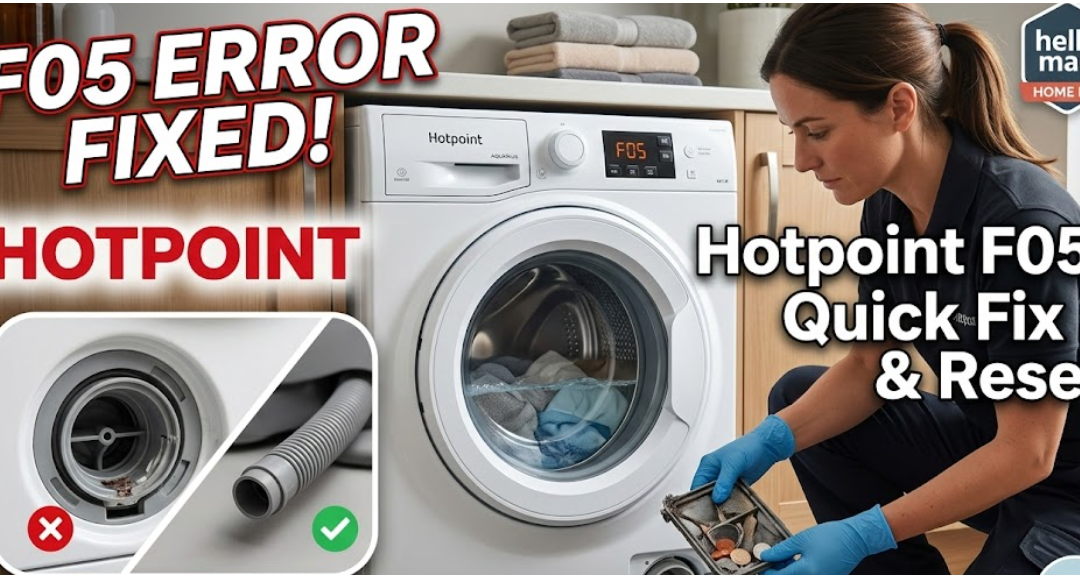
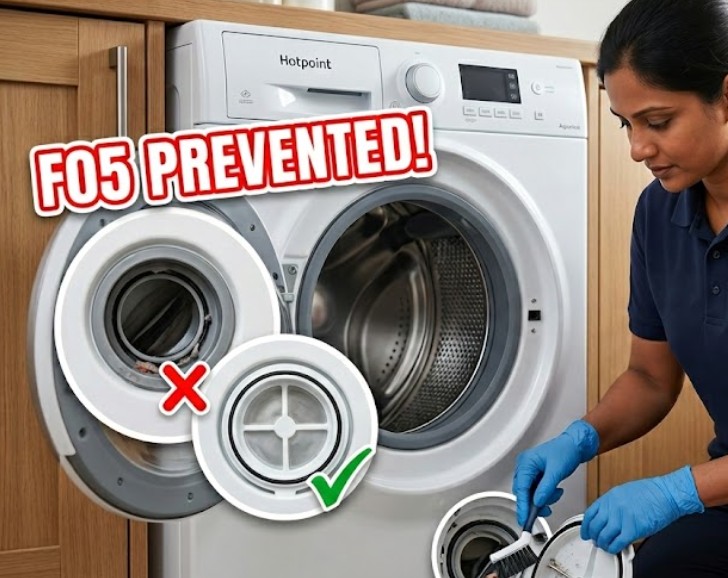
Encountering a Hotpoint Washing Machine F05 error usually means your machine has stopped mid-cycle with a drum full of water. This code indicates a drainage failure. Before calling a plumber, follow this professional troubleshooting guide to clear the blockage and reset your machine.
Quick Fix: How to Resolve Hotpoint F05 Error?
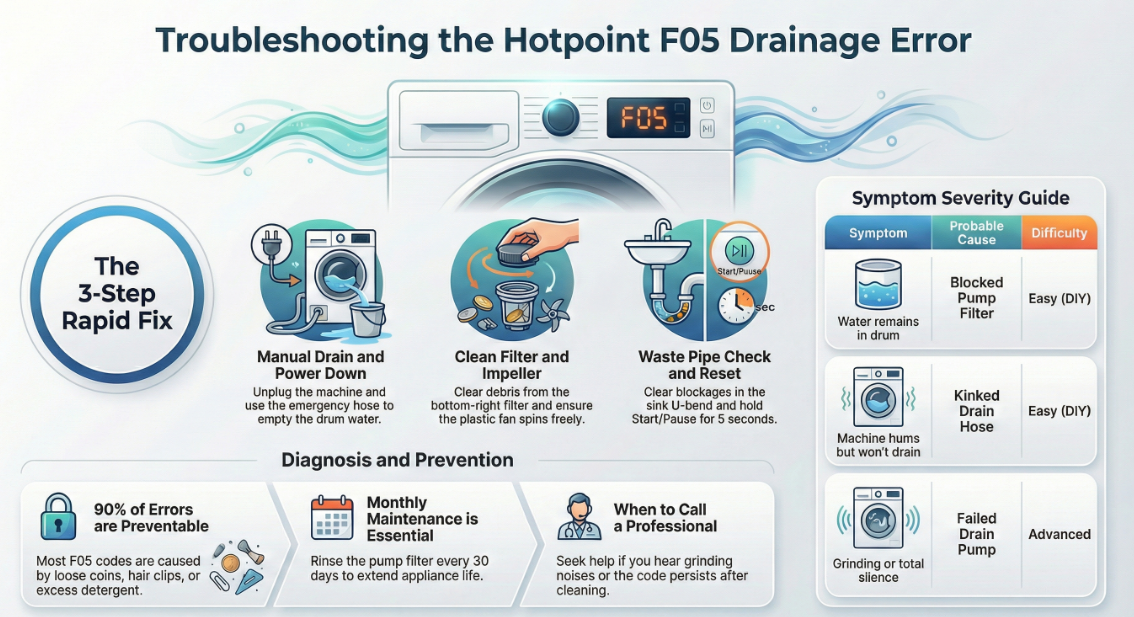
If your Hotpoint washing machine is showing F05 and won’t drain, follow these steps in order:
Manual Drain & Power Down: Turn off the power and unplug the machine. Use the small emergency drain hose (located behind the bottom kick plate) to empty the water into a shallow tray.
Clean the Pump Filter: Locate the circular filter at the bottom right. Unscrew it slowly, clear any debris (coins, hairpins, or lint), and rinse it under warm water.
Check the Waste Pipe: Detach the grey waste hose from your under-sink plumbing. Ensure there is no blockage in the “U-bend” of your sink or the hose itself.
Inspect the Impeller: Reach into the hole where the filter sits. Try to spin the plastic fan (impeller) with your finger. If it’s jammed, a small object is likely stuck in the pump.
Perform a Hard Reset: Plug the machine back in. Press and hold the Start/Pause button for 5 seconds, then run a “Spin & Drain” cycle to see if the code clears.
What Does the F05 Error Mean?
In technical terms, the F05 code triggers when the pressure switch detects that the drum is still full of water after the drain phase of a cycle.
Common Causes
Symptom
Difficulty
Blocked Pump Filter
Water remains in the drum
Easy (DIY)
Kinked Drain Hose
Machine hums but won’t drain
Easy (DIY)
Faulty Pressure Switch
Machine drains but the code stays
Moderate
Failed Drain Pump
Grinding noise or total silence
Advanced
How to Force Open a Locked Hotpoint Door?
When the F05 error occurs, the door often remains locked to prevent flooding. Do not pull the handle.
Step 1: Drain the water manually via the filter (see above). The door will usually unlock once the sensors detect the water is gone.
Step 2: If it remains locked, unplug the machine for 30 minutes.
Step 3: Use the manual override (a small plastic tab often located near the filter) to release the latch.
What are the Expert Maintenance Tips to Prevent F05?
To keep your drainage system clear and extend the life of your Hotpoint appliance:
Clear Pockets: 90% of F05 errors are caused by coins, hair clips, or loose change.
Detergent Check: Avoid using excess detergent; “over-sudsing” can confuse the pressure switch and trigger false error codes.
Frequently Asked Questions (FAQ) About Hotpoint Washing Machine F05
1. Why is my Hotpoint machine still showing F05 after cleaning the filter?
If the filter is clean, the issue is likely a blocked pressure chamber or a faulty pressure switch. These parts monitor the water level. If the chamber is blocked with silt, the machine “thinks” it’s still full of water.
2. Can I reset the F05 error without opening the machine?
A “Hard Reset” (unplugging for 30 minutes) can clear software glitches. However, if there is a physical blockage in the pump, the code will return as soon as the next drain cycle begins.
3. How do I know if my drain pump has failed?
If you have cleared all blockages and the machine still won’t drain—and you hear a loud clicking or grinding noise—the pump motor has likely failed and requires replacement.
Safety & Technical Review
Appliance Maintenance Professional
This guide has been audited for technical accuracy, electrical safety protocols, and part-compatibility data to ensure compliance with UK appliance repair standards and manufacturer specifications.
Home Diagnostics and Technical Standards Specialist at Hello Mag. She provides high-level Expertise in appliance mechanics and scientific pest management, ensuring every guide follows strict safety protocols and manufacturer standards. As a leading Authority on technical home specs, Kanimozhi audits complex data to provide homeowners with the most accurate, verified, and reliable diagnostic solutions available.